Lesson 12 · Daily Routine Capstone
Sixteen nodes. Every idea from Lessons 01–11. This is the shape real automation takes.
The problem
Build the routine you would actually schedule: reach a known screen, check there's enough energy to bother, collect up to N targets — skipping none-left states cleanly — count what you got, report, and end honestly whatever happens.
This is deliberately the same shape as the large farm-style automations experienced users run: a parameterised trip with recovery, a resource gate, a bounded loop with an early exit, and per-item resilience.
What you will learn
Nothing new — that's the point. You will combine: Sub Flow recovery (09/11), OCR gating (05/06), a Flow-Input-driven loop (07), Break on "none left", retryable taps (08), counting (07), and endings that name their cause (everywhere).
The flow
Sixteen nodes do not fit one readable screenshot, so the capstone comes in three parts at full zoom — setup, the loop, and the wrap-up:
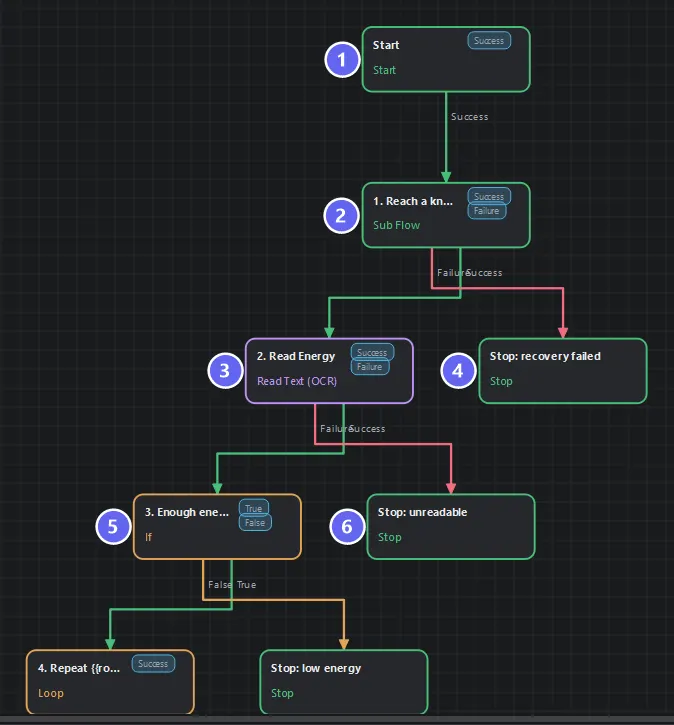
Setup: ① Start ② Reach a known screen — the Sub Flow from Lesson 11, reused rather than rebuilt ③ read the energy ④ its unreadable ending ⑤ is there enough? ⑥ its not-enough ending. Every guard gets its own honest Stop before the real work starts.
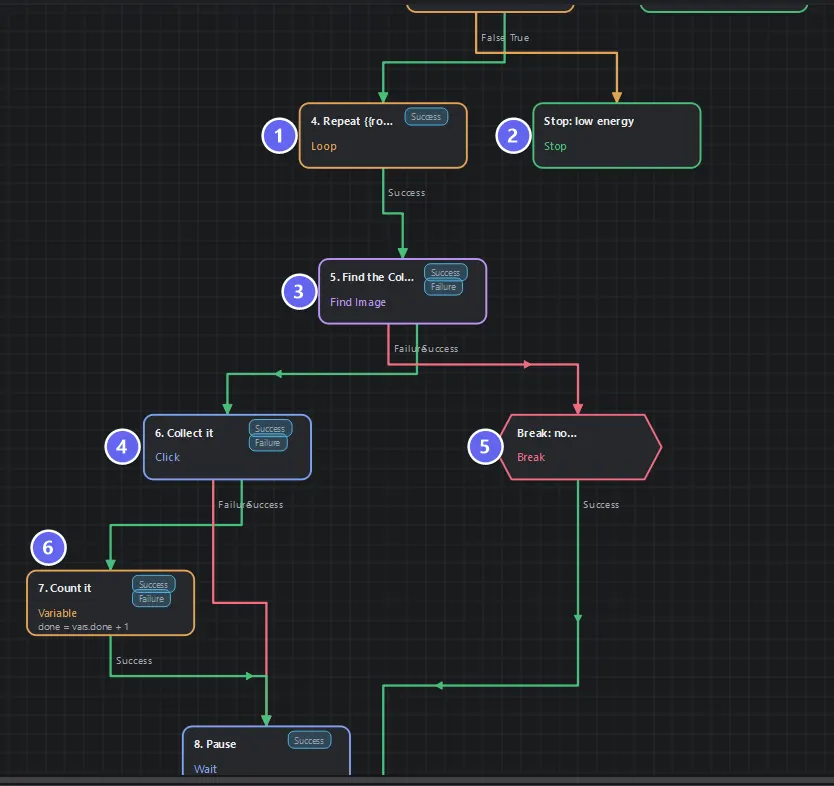
The loop: ① the Loop ② the low-energy ending from part 1 ③ find the Collect icon ④ tap it ⑤ Break when there is nothing left to collect — the loop's early exit ⑥ count what you collected.
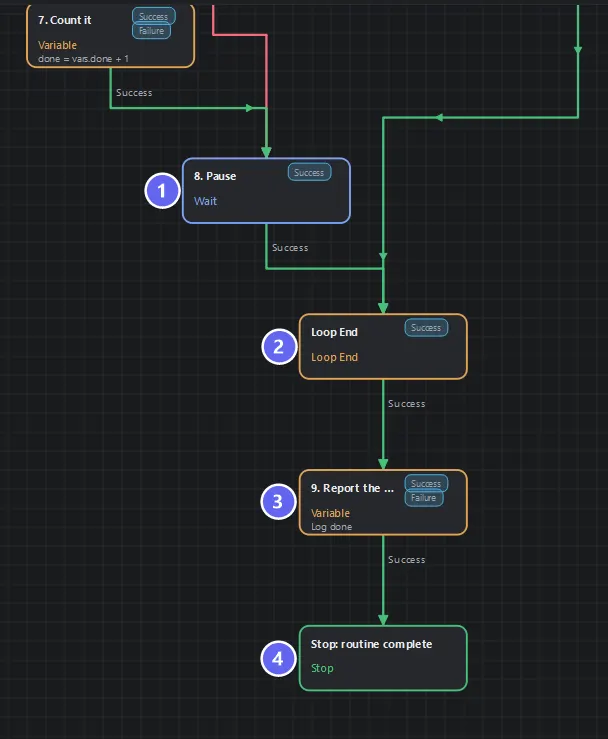
Wrap-up: ① the pace Wait ② Loop End ③ log the total ④ Stop: routine complete — one success ending for the whole routine.
Read the shape rather than the nodes: main spine down the middle, error endings hanging left, the Break detour right. A stranger can trace the happy path in seconds — that readability is a feature you built, with numbered names and Auto Layout.
Build it
Declarations: rounds (number?, default 3, Input ✓ Required ✓), done (number, default 0), energy (number?).
| # | Node | The Lesson it came from |
|---|---|---|
| 1 | Sub Flow → Lesson 09, Failure → recovery failed | 09, 11 |
| 2 | Read Text, Energy readout, Percentage → energy | 05, 06 |
| 3 | If {{energy}} >= 20; False → low energy (success) | 05 |
| 4 | Loop, count mode, max {{rounds}} | 07 |
| 5 | Find Image Collect icon, 3000 ms, Failure → Break nothing left | 03, 04 |
| 6 | Click, source = node 5, retry ×2 / 400 ms / ×1.5; Failure → pause (skip the count) | 03, 08 |
| 7 | Variable done + 1 — only on the success path | 07 |
| 8 | Wait random 800–1400 ms; → Loop End (aggregation: iteration count) | 07 |
| 9 | Variable log done → Stop: routine complete | 07 |
Wire exactly as diagrammed; the subtle edges are node 6's Failure → node 8 (a failed tap skips the count, not the loop) and Break → Loop End. Save, Auto Layout.
Design decisions worth stealing
- Low energy is a success. The routine's job includes knowing when there is nothing to do. Only
recovery failedandunreadableare failures — states where the flow couldn't do its job at all. - The gate runs before the loop, so a tired run costs two nodes, not N rounds of failed hunting.
- Break ≠ failure. "No more targets" ends the loop early and still reports and succeeds. Compare its meaning with node 6's Failure — one is world state, the other operational trouble, and they route differently.
donecounts achievements; the Loop End counts iterations. After a run with one failed tap: iterations 3,done2. Both numbers tell you something; neither substitutes for the other.- Every ending is a sentence. Six endings, six causes, zero archaeology at 2 a.m.
Run it, then schedule it
Run with rounds = 3 on the plain dashboard: recovery (instant), energy 85 ≥ 20, three find-tap-count-pause rounds, log done = 3, success. Try dashboard.html?energy=15% — the run ends success · Energy too low in ~2 seconds without hunting anything.
Then make it routine: add it to the instance's Flow Queue (its rounds value stores with the entry) and create a Scheduler entry — the demo environment ships exactly this setup:
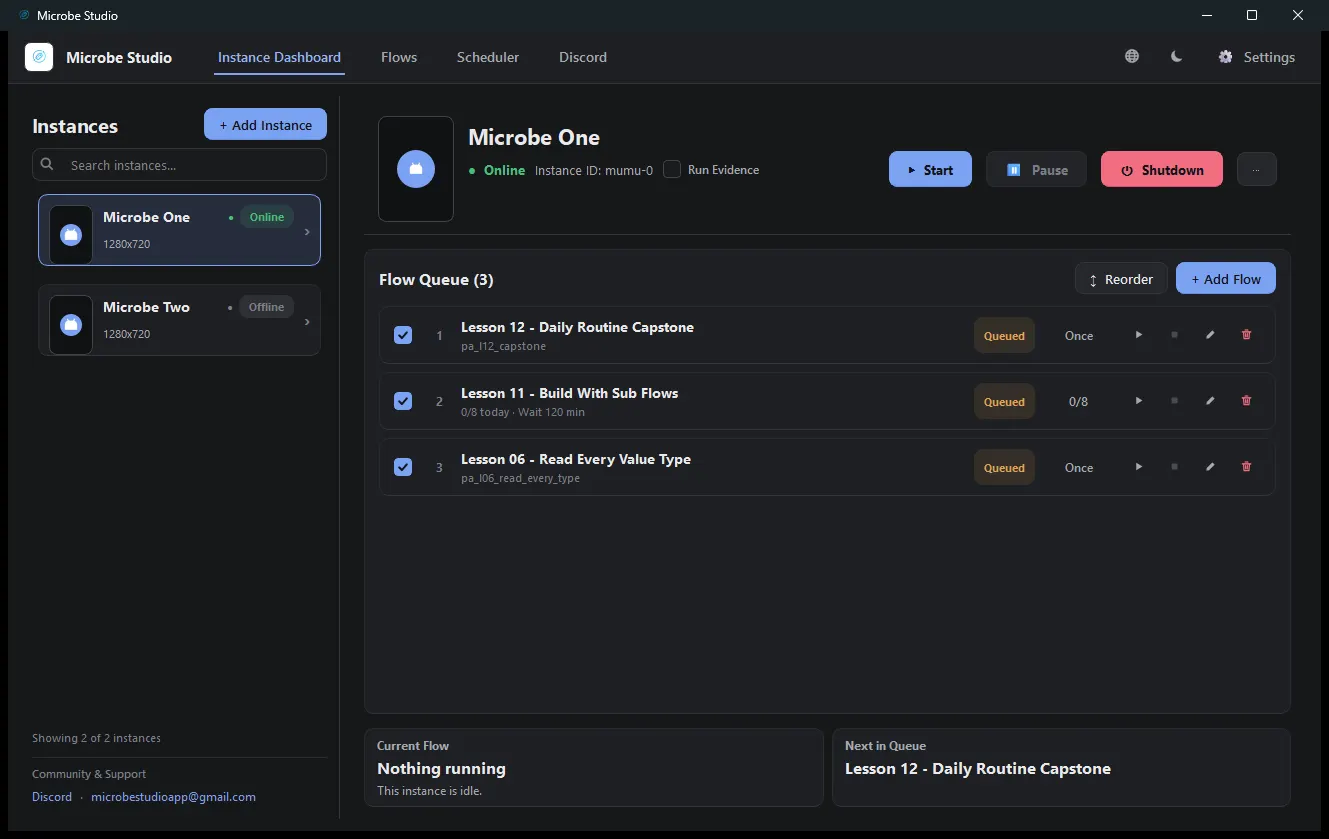
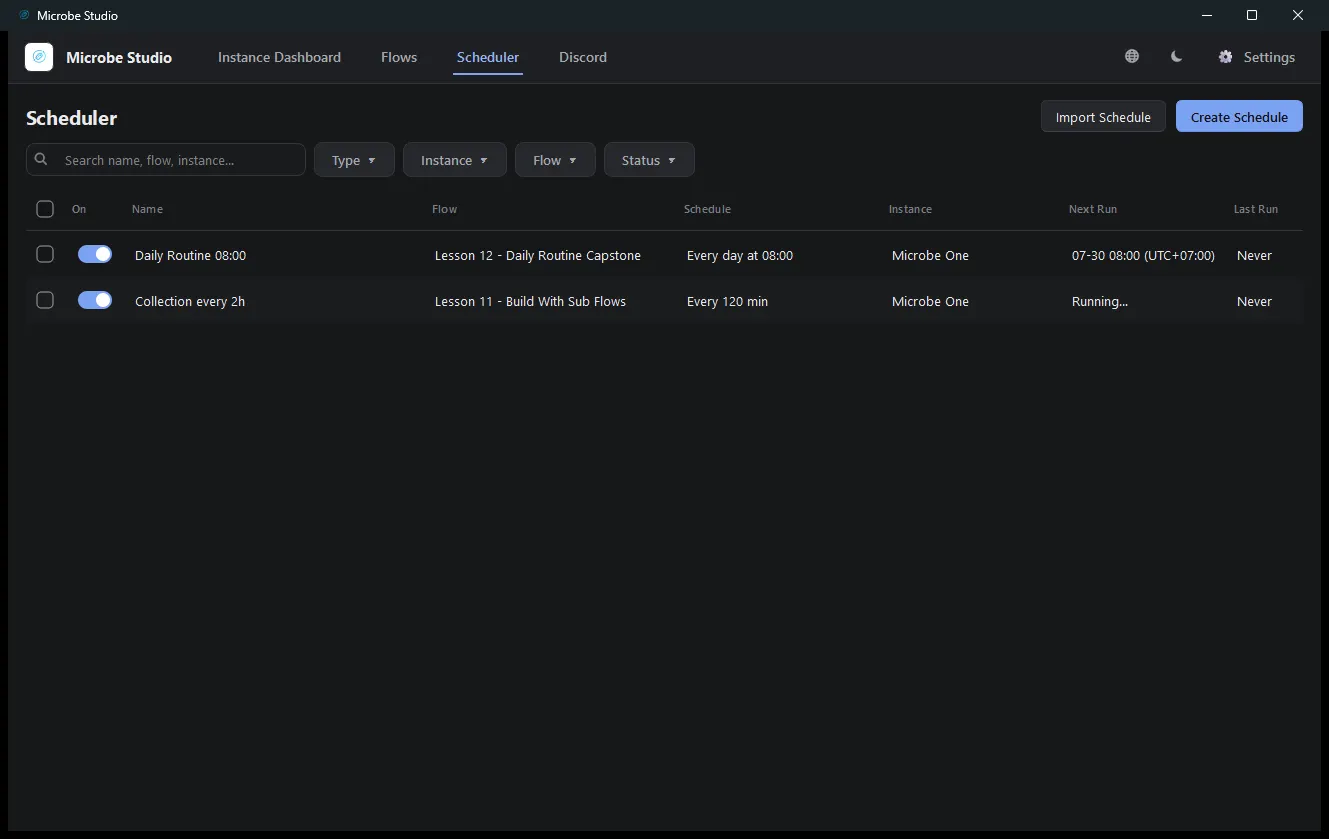
The Scheduler decides when it runs; the Queue decides what runs on the instance. Your flow neither knows nor cares — parameterised, honest-ended flows slot into any caller: the Run form, a parent flow, a queue, a schedule.
Common mistakes
| Mistake | What happens | Fix |
|---|---|---|
| Counting on both tap outcomes | done overstates reality | Count only the success path |
| Break wired as a failure ending | "None left" kills an otherwise good run | Break → Loop End → report |
| Gate inside the loop | N energy reads per trip | Gate once, before |
rounds not Required | Runs start with a blank count | Required ✓ |
| Endings collapsed into two | Diagnosis by log-diving | One ending per cause |
Troubleshooting
Ends success · 0 collected immediately.
The Collect icon wasn't found on round one — Break fired. Wrong screen in front, or the template needs recapturing.
The run dies with a node-executions error at high rounds.
Loops multiply nodes; the flow's maxNodeExecutions (5000 here) is the ceiling. Raise it in flow settings for genuinely long trips.
Duplicate collections across scheduled runs. That's Lesson 10's job — add the cooldown guard (read the cycle timer → Memory Match → remember) in front of the loop. The demo Farm Resources pattern does exactly this.
Where you are now
You can act, verify, read, decide, repeat, retry, recover, remember, compose, and schedule. That is the complete toolkit — everything past this point is vocabulary, and you know where the dictionary is:
- Node Reference — every setting of every node.
- Concepts — why the runtime behaves as it does.
- Scheduler and Flow Queue — running fleets of this.
Take it further: add the Lesson 10 guard to this capstone; make the pause range a Flow Input; split the loop body into its own child flow and watch the capstone shrink to eight readable nodes. Each is an evening; each is exactly how real farm automations grew.
Congratulations — build something of your own next. 🎓