Lesson 10 · Cooldown With Memory
Variables die with the run. Some facts shouldn't: "I already collected this" needs to survive into the next run.
The problem
A scheduled flow runs every few minutes, but the reward it collects refreshes only once per cycle. Collect twice in one cycle and the second attempt is at best wasted, at worst harmful.
The flow needs to ask, at the top of every run: did a recent run already do this? — and the answer must live outside any single run.
What you will learn
- Runtime Memory: entries with a name, fields, a scope, and a TTL.
- Memory Match: testing a candidate against every remembered entry.
- The cooldown-guard pattern: match first, then remember, then act.
- Why TTL beats manual cleanup.
Before you start
- Lesson 09 completed. OCR gate on (we read the cycle timer).
The flow
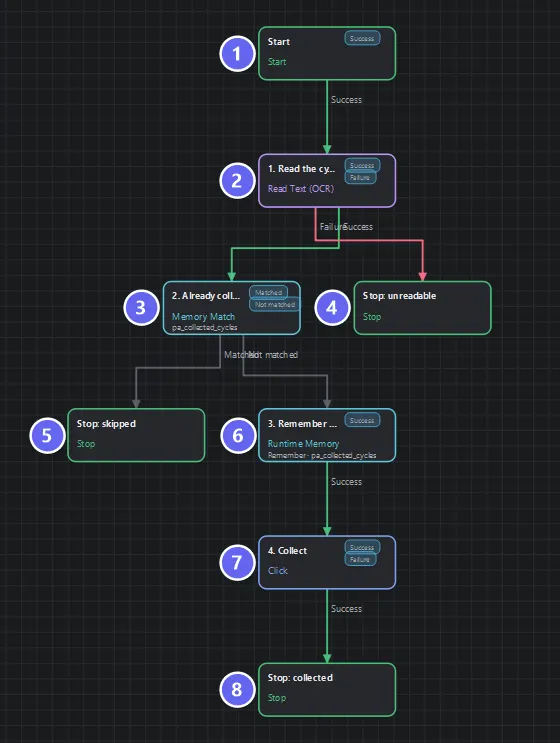
Badges number the nodes in reading order, matching the Build it steps. The Memory Match at the top is the whole point — it decides whether the work below runs at all, so the cooldown lives in one node instead of being scattered through the flow.
Build it
- New flow; declare
cycle_minutes(number?). - Read Text
1. Read the cycle timeron the Next Cycle readout, type Time, minutes →cycle_minutes. - Memory Match
2. Already collected this cycle?:- Memory:
pa_collected_cycles - Expression:
{{item.cycle}} == {{cycle_minutes}}
- Memory:
- Runtime Memory
3. Remember this cycle (10 min TTL):- Operation remember, memory
pa_collected_cycles, scope persist - One field:
cycle={{cycle_minutes}} - TTL 600 seconds
- Operation remember, memory
- Click on Collect, and three Stops as diagrammed (
skippedis a success — refusing duplicate work is correct behaviour). - Wire: match first, then remember, then act. Save, Auto Layout.
How the two memory nodes cooperate
Runtime Memory writes; Memory Match reads. An entry is a tiny record — here {cycle: 20} — stored under a memory name, in a scope, with a lifetime:
| Piece | Here | Why |
|---|---|---|
Name pa_collected_cycles | The shared label both nodes use | A typo on either side = a guard that never matches |
Field cycle | What identifies "this work" | Matched as {{item.cycle}} |
| Scope persist | Survives run end and app restart | The whole point — run-scope would forget instantly |
| TTL 600 s | The entry deletes itself | The cooldown expires with no cleanup flow, no stale list |
Memory Match evaluates its expression once per live entry, with the entry under test exposed as {{item.…}}. Any entry satisfying it → matched. Expired entries are simply gone — TTL is what turns "remember forever" into "remember for exactly one cycle".
Order is everything: match → remember → act. Remember before matching and every run matches its own fresh entry — the flow skips forever. Act before remembering and a crash between the two collects twice. The safe order asks first, claims second, works third.
Here equality on minutes is enough. Real coordinates from OCR drift by a pixel — which is why Memory Match takes a full expression: abs({{current_x}} - {{item.x}}) <= 1 matches near, not exact. The capstone's guard uses exactly that trick's simpler cousin.
Run it
- First run: timer reads
04:20→ no entry matches → remember{cycle: 20}→ Collect →success · Collected this cycle. - Run again immediately: same read → matched →
success · Already collected this cycle. No tap happened. - Wait ten minutes (or change the timer:
dashboard.html?timer=07:15) and run: the old entry has expired (or doesn't match) → collects again.
Run 2 is the lesson: a different run, minutes later, knew what run 1 did.
Best practices
- Match first, then remember, then act.
- TTL = the real cooldown, not "long to be safe" — too long skips legitimate work.
persistscope for per-device guards. Usesharedonly when all instances must honour one list — then they overwrite each other's claims by design.- Name memories specifically —
pa_collected_cycles, notdata. - Skipping is success. Wire it as one.
Common mistakes
| Mistake | What happens | Fix |
|---|---|---|
| Remember placed before Match | Matches its own entry; skips forever | Match first |
| Memory name mismatch between the nodes | Guard never matches | Same string both sides |
Field name ≠ {{item.…}} reference | Never matches | cycle ↔ {{item.cycle}} |
| No TTL | Entries pile up; work skipped long after cooldown | Always set one |
Scope run | Forgets at run end — guard does nothing across runs | persist |
Troubleshooting
Never skips, even back-to-back.
Check the memory name on both nodes, then the field/item names, then that the write's scope isn't run.
Always skips. Node order — the remember is upstream of the match. Rewire.
Skips after an app restart, unexpectedly.
That's persist doing its job: TTL is absolute time and survives restarts. If you wanted "this launch only", the session scope is the tool.
Summary
- Runtime Memory + Memory Match = facts that outlive the run, with self-expiring lifetimes.
- The guard pattern is an order: match → remember → act.
- Scope chooses who shares the memory; TTL chooses how long it binds.
Next
You now hold every individual skill: acting, verifying, reading, counting, retrying, recovering, remembering. Lesson 11 · Build With Sub Flows is where flows start calling each other — and your lessons literally become a library.
Also see: Runtime Memory · Memory Match · Variables and Memory