Lesson 09 · Recovery Routine
When the screen is wrong, don't guess forward — recover to a known state, or say clearly that you couldn't.
The problem
A long automation will find itself on an unexpected screen: an interstitial, a detour, a page it never planned for. From there, pressing on blindly makes everything worse. What you want is a routine that answers one question reliably:
Get me back to the dashboard — or tell me you can't.
The universal Android tool for "go back to safety" is the BACK key. The discipline is using it boundedly: check, press, settle, re-check — and give up with a clean failure after a fixed number of rounds, never loop forever.
What you will learn
- The Key Press node.
- The check → act → settle → re-check ladder.
- Converging many exits onto shared endings.
- Why recovery must be bounded.
Before you start
- Lesson 08 completed.
The flow
Two attempts make this flow too tall for one legible screenshot, so here is one attempt per image, at full zoom:
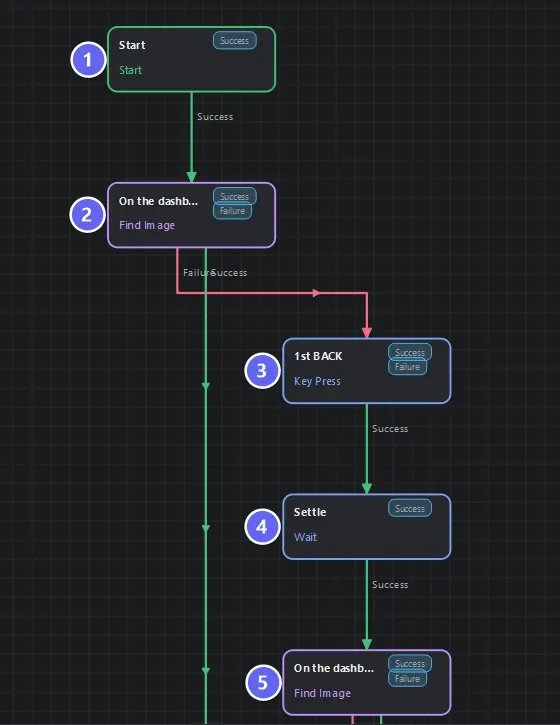
First attempt: ① Start ② "on the dashboard?" — if yes it leaves immediately down the long green edge on the left ③ one BACK press ④ a Settle wait ⑤ ask again.
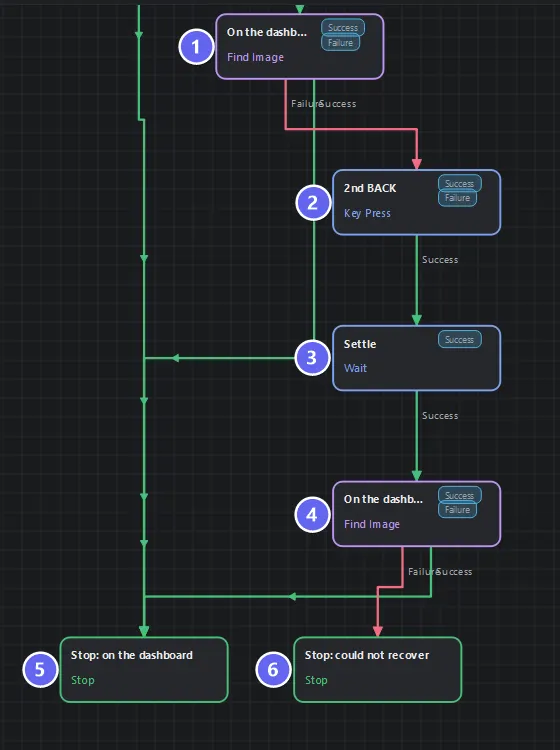
Second attempt and the endings: ①–④ repeat the same BACK · settle · re-check shape one step further right, then ⑤ Stop: on the dashboard collects every success and ⑥ Stop: could not recover is the one honest failure.
The staircase shape is the design: each step right is one more recovery attempt, and every green Success edge converges on the single happy ending.
Build it
- New flow. The "known screen" marker is the Practice App logo (the "M" mark, top-left of every page) — capture it once as a template. A good marker is something on the target screen and nowhere else.
- Add three identical Find Image checks
On the dashboard?— same template, timeout 1500 ms (a question, not a wait — Lesson 04's rule). - Between them: Key Press nodes with Key = BACK, each followed by a Wait 600 ms (reason:
after BACK). - Two endings:
Stop: on the dashboard(success) andStop: could not recover(failure, message naming the giving-up point). - Wire the ladder as diagrammed — every check's Success goes to the same success Stop.
- Save, Auto Layout.
Why it's built this way
| Choice | Reason |
|---|---|
| Check first, before any BACK | Already home? Zero presses, done in ~300 ms |
| Settle after every BACK | Screens animate; an instant re-check reads the old frame |
| Re-check after every BACK | Each press must prove progress — no blind volleys |
| Exactly two presses, then give up | On the app's root screen, BACK exits the app entirely — unbounded BACK-mashing makes things worse |
| One shared success Stop | "How I got home" doesn't matter; "I am home" does |
Why not a Loop? You could express this as a 2-iteration loop — and in Lesson 12 similar logic is loop-shaped. Unrolled, the ladder reads at a glance and each rung can later diverge (a different key on the second attempt, say). For two attempts, unrolled is the clearer flow; for five, use a loop. Choosing the readable shape is itself a skill this course teaches.
Run it
- From the dashboard: first check matches →
successin under a second, zero presses. - Navigate the emulator to
verify.html, run: check fails → BACK (browser goes back to the dashboard) → settle → second check matches →success, one press. - Open a different app entirely, run: two presses, three failed checks →
failure · Not on a known screen after 2 BACK presses— the honest outcome the caller can act on.
Best practices
- Pick a marker unique to the target screen. Logos and fixed chrome beat anything that appears on several pages.
- Short check timeouts — each is a question; three questions at 1500 ms cost at most 4.5 s in the giving-up case.
- Always settle after navigation keys.
- Bound every recovery. The failure Stop is not pessimism; it is the contract that makes this flow safe to call from anywhere.
- This flow is your first real building block — Lessons 11 and 12 call it as a function.
Common mistakes
| Mistake | What happens | Fix |
|---|---|---|
| BACK without re-checking | You don't know if it helped | Check after every press |
| Unbounded BACK loop | Exits the app, then presses BACK in the launcher | Fixed attempts + failure ending |
| Marker appears on several screens | "Recovered" to the wrong page | Choose a unique marker |
| No settle | Re-check reads the pre-BACK frame | 600 ms after each press |
| Long check timeouts | Slow giving-up path | 1500 ms each |
Troubleshooting
It reports recovered but the screen is wrong. Your marker isn't unique — it matched on the wrong page. Pick a more specific template.
BACK does nothing in some app. Some screens intercept BACK. That's exactly why the routine gives up cleanly — the caller decides what's next (restart the app, alert a human).
It always needs both presses from the browser. Your first press lands mid-animation. Raise the first settle to 800 ms.
Summary
- Recovery = check → act → settle → re-check, bounded, with an honest failure.
- Key Press BACK is the universal "towards safety" move; unbounded it becomes the hazard.
- A recovery flow's failure ending is a promise to its future callers.
Next
The routine never repeats work — but your flows still might, across runs. Lesson 10 · Cooldown With Memory gives a flow memory that outlives the run, so "already did that" becomes something it can know.
Also see: Key Press · Find Image · Sub Flow