Introduction to Microbe Studio
Microbe Studio is a Windows desktop app for building and running automation workflows on Android and iOS emulator instances through a visual Flow Canvas. Instead of writing scripts by hand, you design flows with visual nodes, connect each processing step, and run the flow on one or many emulator instances.
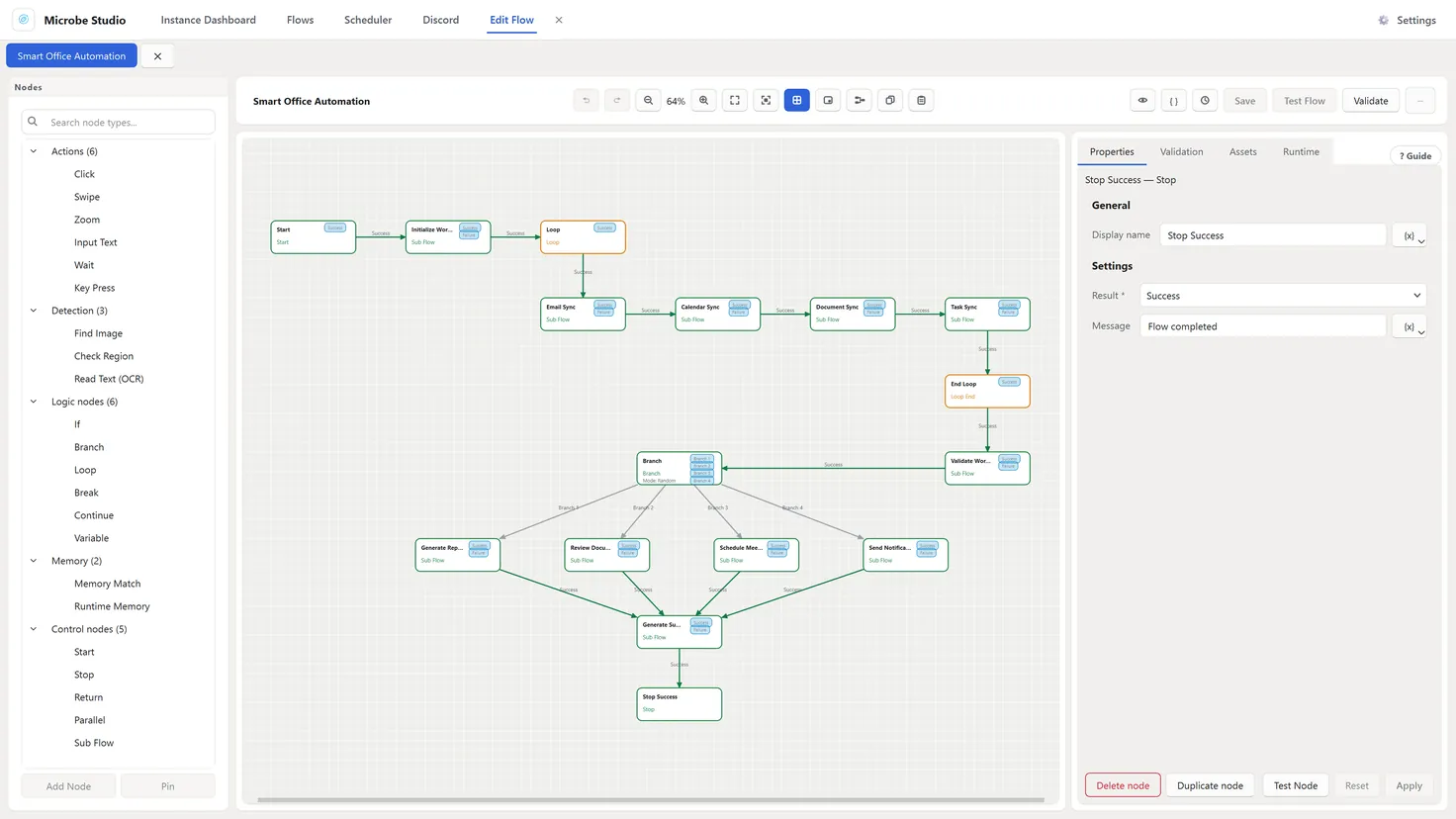
Microbe Studio is built for individuals, operations teams, and businesses that need to automate repetitive tasks, standardize emulator workflows, and manage many instances from one place.
What can Microbe Studio help you do?
- Build flows without programming: create automation workflows without writing Python, JavaScript, or emulator control code.
- Design with a visual Flow Tree: arrange Actions, Conditions, Loops, Detection nodes, and other logic blocks into a process that is easy to read and maintain.
- Run across multiple instances: manage many emulator instances, run flows in parallel, queue tasks, and monitor execution status.
- Customize workflows for your own process: combine nodes to handle scenarios ranging from simple repeated tasks to more complex operational flows.
- Reuse flows and sub flows: extract common steps into reusable flows to save setup time and keep workflows consistent.
- Use OCR and screen recognition: detect content on the emulator screen so a flow can choose the next step more accurately.
What makes Microbe Studio different?
With a traditional automation approach, you often need to learn programming, hire a developer, or build an automation system from scratch. With Microbe Studio, the workflow is closer to how operations teams already think:
- Prepare the emulator.
- Create a flow with nodes.
- Connect the processing steps.
- Test the flow.
- Run the flow on the instance that needs automation.
This approach lets non-programmers build automation while still giving technical users enough flexibility to create more advanced workflows.
Who is this documentation for?
- New users who need to install Microbe Studio and MuMu before running their first flow.
- Operators who need to manage instances, queues, schedules, and the Discord Bot.
- Flow builders who need to understand Flow Builder, node types, node properties, testing, and sub flows.
- Teams that need a consistent way to write, test, and reuse automation workflows.
Where should you start?
If you are new to Microbe Studio, follow this order:
- Install Microbe Studio
- Set Up MuMu
- Connect MuMu to Microbe Studio
- Instance Dashboard
- Flow Builder Overview
After you understand the basic flow, continue with the sections about flow management, scheduling, node types, and common issues.