Lesson 04 · Handle an Optional Popup
Some days the reward popup greets you, some days it doesn't. Your flow must be right both ways.
The problem
Real apps interrupt: daily rewards, offers, notices. They appear sometimes. An automation that assumes the popup is always there breaks on the days it isn't; one that assumes it's never there breaks on the days it is.
The Practice App makes this reproducible: dashboard.html?popup=1 shows the reward popup, plain dashboard.html doesn't. One flow, two realities.
What you will learn
- Branching where both branches are success.
- Using a short detection timeout as a question, not a wait.
- Rejoining branches so the real work exists once.
- Producing both test states on demand.
Before you start
- Lesson 03 completed — this lesson reuses its template capture skill.
The flow
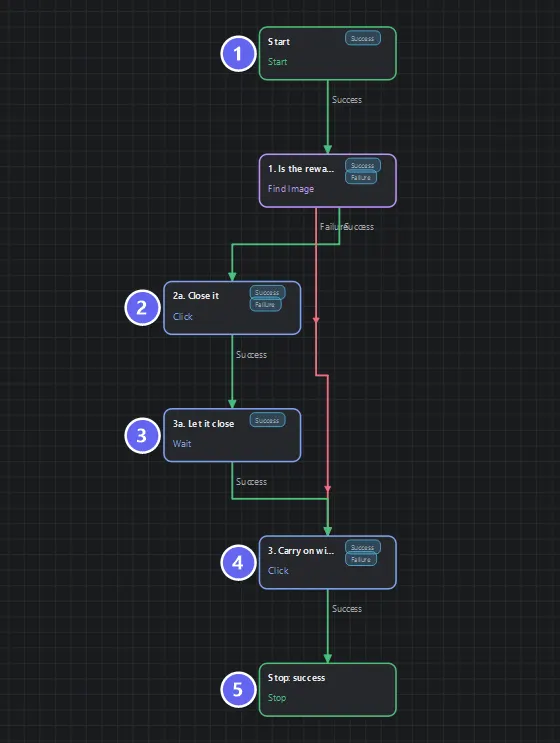
Badges number the nodes in reading order, matching the Build it steps. Note the shape: the detection splits, the popup branch dismisses and settles, and both paths rejoin at the same continuation — one flow, both states.
Notice the shape: a fork that rejoins. The real work (3. Carry on) exists once — both branches funnel into it.
Build it
- New flow. Add a Find Image named
1. Is the reward popup showing?with the popup's star icon template (capture it with?popup=1loaded). Timeout2000ms — deliberately short. - Add a Click named
2a. Close it, region drawn around the popup's Close button. - Add a Wait named
3a. Let it close,600ms, reasonclose animation. - Add a Click named
3. Carry on with the real work, region on the Collect button. - One Stop:
success, messageHandled both states. - Wire: the question's Success → Close → Wait → Carry on; the question's Failure → Carry on directly. Carry on → Stop.
- Save, Auto Layout.
Why each node
| Node | Role | Note |
|---|---|---|
| Find Image (2000 ms) | Asks "is it here now?" | Short timeout: you are not waiting for it to arrive |
| Click Close + Wait | The popup-only detour | The settle stops the next click reading a mid-close frame |
| Click Collect | The real work | Exists once, after the rejoin |
| One Stop | Both paths end identically | Because both paths are equally correct |
The timeout is the design decision. In Lesson 03 the timeout meant "give it time to appear". Here it means "look once, briefly". A 30-second timeout on this node would cost 30 seconds every popup-free day — the flow would work, and waste half a minute daily. Timeouts encode intent.
The 2a / 3a numbering marks a detour path; plain numbers mark the main path. On a 20-node canvas, this convention lets a reader reconstruct the structure from the names alone.
Run it
Test both realities:
- With popup — load
dashboard.html?popup=1, run: match (~300 ms) → Close → settle → Collect →success. - Without — load plain
dashboard.html, run: 2 s of polling, no match → straight to Collect →success.
Same flow, same ending, different route. Check the run log: you can see which route each run took by which nodes executed.
Best practices
- Short timeouts for optional elements — 1500–2500 ms. You are asking, not waiting.
- Rejoin branches. Duplicate "real work" on both branches is the classic path to maintenance bugs — you will edit one copy and forget the other.
- Settle after the dismissal. The next action must not race the close animation.
- Test both states deliberately. The
?popup=1switch exists precisely so you never have to wait for luck to test the rare path.
Common mistakes
| Mistake | What happens | Fix |
|---|---|---|
| Long timeout on the popup check | Wastes that time on every popup-free run | 2000 ms is plenty |
| Duplicating the real work on each branch | Two copies drift apart | Rejoin into one node |
| No settle after Close | Next tap lands on a half-closed overlay | Keep the 600 ms Wait |
| Treating "no popup" as failure | False alarms in the log | Both outcomes are success |
Troubleshooting
The popup is there but the check misses it. The template was probably captured with the dimmed background included. Recapture just the star icon.
Close is clicked but the next tap still hits the overlay. Raise the settle to 800–1000 ms.
The flow always takes the "no popup" branch with ?popup=1.
You captured the template at a different zoom or the browser toolbar shifted the layout — recapture on the same screen you run against.
Summary
- Optional elements are a branch, not an error: short check, detour to dismiss, rejoin.
- Timeout length encodes what a detection means — waiting versus asking.
- Rejoined branches keep the real work in one place.
Next
So far every decision came from whether something is visible. Lesson 05 · Read a Number starts making decisions from what the screen says — your first OCR.
Also see: Find Image · If — Node outcome mode for branching on this check later in a flow