Lesson 07 · Count With Variables
Do it N times — where N is chosen at run time, not baked into the flow.
The problem
Tap Collect three times. Tomorrow, five times. The flow shouldn't change — only the number should.
This lesson introduces the machinery every repetitive automation stands on: a Loop, a counter variable, and a Flow Input the operator fills in when starting the run.
What you will learn
- The Loop / Loop End region: the body repeats, the wiring is generated.
- Counting with a Variable node (
collected = collected + 1). - Declaring a Flow Input —
{{target_count}}as the loop's iteration count. - Random pacing so repeats don't look mechanical.
- Logging a value into the run log.
Before you start
- Lesson 06 completed.
The flow
This flow is taller than one comfortable screenshot, so here it is in two halves at full zoom. The badges number the nodes in reading order, matching the Build it steps below.
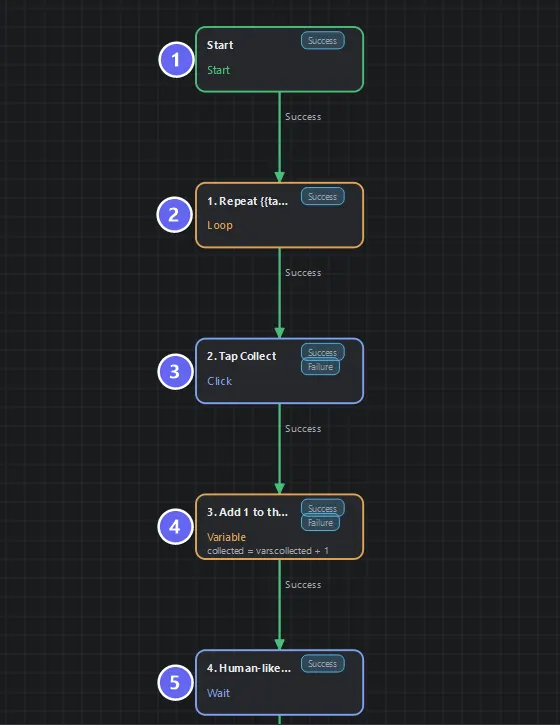
Into the loop: ① Start ② the Loop that repeats {{target_count}} times ③ the Click ④ the Variable that adds 1 ⑤ the Wait that keeps the pace human.
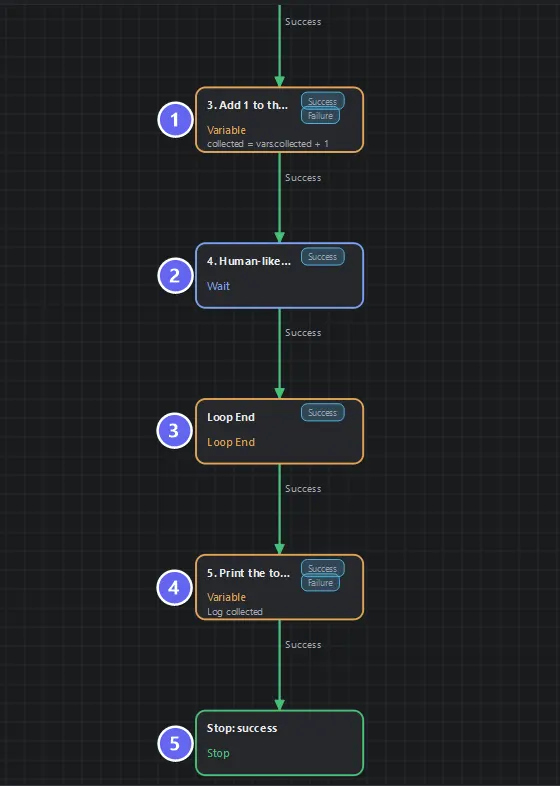
Out of the loop: ① the counter increment and ② the Wait again (both shown for continuity), then ③ Loop End — the node the editor created for you — ④ the Variable that logs the total, and ⑤ the success ending.
Build it
- New flow. Declare two variables:
collected— number, default0.target_count— number?, default3, Input ✓, Required ✓, descriptionHow many times to collect this run.
- Add a Loop named
1. Repeat {{target_count}} times: mode Count, Max iterations{{target_count}}— yes, a variable reference works here. Its paired Loop End appears automatically. - Body, in order: Click on the Collect button → Variable
3. Add 1 to the counterwith one row, Add to it:collected+1→ Wait in random mode,800–1300ms, reasonpace between taps. - On the Loop End, set Aggregation: iteration count — the loop will report how many passes really ran.
- After the Loop End: a Variable node with one Show in run log row for
collected, thenStop: success · Collection loop finished. - Wire the chain as diagrammed — note there is no back-edge to draw: the Loop/Loop End pair generates the repeat wiring.
- Save, Auto Layout.
Why each piece
| Piece | Role |
|---|---|
| Loop (count mode) | Decides before each pass whether the body runs again |
{{target_count}} as the count | The repeat count arrives per run, from the operator |
| Variable +1 | The flow's own memory of its progress |
| Random Wait | 800–1300 ms re-rolled each pass — repeats stop being metronomic |
| Loop End aggregation | Independent evidence of how many passes ran |
| Log row | Puts collected into the run log where you can see it |
Flow Inputs turn a flow into a function. Because target_count is declared as an input, the Run form asks for it before each run (the default 3 pre-fills). The same saved flow runs with 3, 5, or 20 — no editing. In Lesson 11 a parent flow will pass this value in programmatically.
Why count with a Variable when the loop already counts? Two reasons. The counter survives the loop — the report node reads it after the Loop End. And it counts what you choose: in the capstone, the counter only increments on successful collections, while iterations tick regardless. Iterations and achievements are different numbers.
Each pass here costs a tap plus ~1 second of pacing. At target_count = 20, that's ~20 seconds — fine. But the same multiplication applies to every slow node you ever put in a body. Budget loops consciously, and note that node executions inside the loop also count toward the flow's maxNodeExecutions guardrail.
Run it
Run the flow — the Run form asks for target_count. Accept 3. Expected: three taps roughly a second apart, then the log shows collected = 3, ending success · Collection loop finished.
Run again with 5. Five taps. Same flow.
Best practices
- Bind loop counts to Flow Inputs whenever a human might want a different number.
- Random pacing inside loops — fixed delays are both slower than needed and unmistakably robotic.
- Reset counters at the natural boundary.
collectedstarts at its default0each run; if a flow loops over trips, reset at the trip boundary, not the top of every loop. - Log the totals you care about. A run log that says
collected = 5answers tomorrow's "did it actually work?". - Required inputs for required decisions.
Required ✓stops a run from starting with a blank count.
Common mistakes
| Mistake | What happens | Fix |
|---|---|---|
Setting instead of adding (collected = 1) | Counter is always 1 | Use Add to it / collected + 1 |
| Counter declared without default | null + 1 fails the row | Default 0 |
| Drawing a back-edge to the Loop | Not how loops work here | The region generates the routing |
| Wait placed outside the body | One pause total, not per pass | Keep it between Click and Loop End |
Expecting the input prompt without input ✓ | Uses the default silently | Tick Input on the declaration |
Troubleshooting
The loop runs exactly once.
Max iterations didn't resolve — check the reference is exactly {{target_count}} and the variable is declared.
collected logs as 0.
The counter node sits outside the body, or its row sets rather than adds.
The run never asks for the count. The declaration is missing Input ✓, or you launched via a context that supplies stored values (a queue entry, later lessons).
Summary
- Loop/Loop End repeat a body; the routing is generated, the count can be a
{{variable}}. - Flow Inputs make one saved flow serve many runs.
- Count achievements in your own variable; let the loop count iterations.
Next
Everything so far assumed taps land and reads succeed. Lesson 08 · Retry or Branch is about the day they don't — and choosing the right failure tool instead of the reflexive one.
Also see: Loop · Variable · Wait · Variables and Memory