Lesson 08 · Retry or Branch
Two kinds of "it didn't work", two different tools. Confusing them makes flows slow and flaky.
The problem
Tap the Upgrade button reliably. Two distinct things can go wrong:
- The button isn't on screen (wrong page, slow load).
- The button is there but the tap doesn't register (UI mid-settle, transient input hiccup).
Problem 1 is a state question — the answer is detection with an honest timeout, and a branch. Problem 2 is an operational failure — the answer is a retry policy on the tap.
What you will learn
- Attaching a retry policy — attempts, retryable results, backoff.
- Why retry on a Find Image "to look harder" does nothing.
- Three endings that name which thing failed.
Before you start
- Lesson 07 completed.
The flow
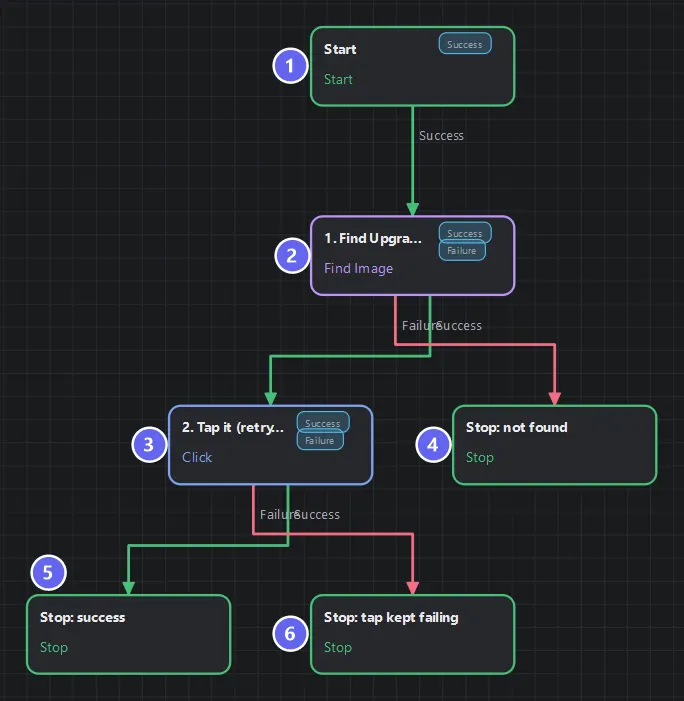
Badges number the nodes in reading order, matching the Build it steps. The retry policy is invisible here on purpose: it is a property of the node, so the canvas shows only the branch you wired for the failure that retrying could not fix.
Build it
- New flow. Find Image
1. Find Upgrade, template = the Upgrade arrow icon, timeout 6000 ms, no retry policy. - Click
2. Tap it, coordinate source = node 1. In its Properties, open the retry section and set:
| Retry setting | Value | Meaning |
|---|---|---|
| Max attempts | 3 | Three attempts total (first + two retries) |
| Retry on | failure, timeout | The only retryable results |
| Backoff | 500 ms | Wait before attempt 2 |
| Backoff multiplier | 1.5 | Attempt 3 waits 750 ms |
- Three Stops, as diagrammed — note the two different failure messages.
- Wire, Save, Auto Layout.
The idea that makes this lesson
Detection already retries. A Find Image re-captures and re-matches every poll interval for its whole timeout — that is its retry loop. Its 6000 ms says "the button may legitimately take up to six seconds to exist".
And here is the trap: adding a retry policy to a Find Image does nothing for "not found". A not-found routes Failure but carries status success — the search worked; the thing wasn't there. Retry only fires on status failure/timeout. So the reflexive "add retry to look harder" is a no-op; the honest fix is more timeout, a better template, or accepting the branch.
Actions are the opposite. A Click either dispatches or operationally fails — there's no polling to extend. A transient input failure is exactly what retry-with-backoff is for: the 500 ms gap lets whatever swallowed the tap finish settling before attempt two.
Three endings, because two things can fail. not found and tap failed after 3 attempts send you to different fixes at a glance — one is a navigation/template problem, the other an input/device problem. One shared "failed" Stop would bury that.
Run it
- Dashboard in front: match, tap,
success · Upgrade queued(the activity log gains "Upgrade queued"). - Wrong screen in front: six seconds of polling →
failure · Upgrade button not on this screen. Note the run log shows one Find Image execution — no retry fired, exactly as designed.
The tap-failure ending is hard to provoke against a healthy emulator — that's the point of it being the rare path. Trust the wiring; you will meet it in the wild.
Best practices
- Retry on actions, timeouts on detections. Say it until it's reflex.
- 2–3 attempts, always with backoff. An immediate retry usually hits the same busy state; ten attempts just delays the truth.
- Name failure endings after the failed thing.
- Keep
captureScreenshotPerAttemptoff in production — turn it on only while diagnosing, it writes an image per attempt. - Remember the worst case: 3 attempts × timeout + backoffs. Retry multiplies time as surely as loops do.
Common mistakes
| Mistake | What happens | Fix |
|---|---|---|
| Retry policy on Find Image for "not found" | Never fires — status is success | Raise the timeout |
| Attempts = 10 | Long stalls before admitting failure | 2–3 with backoff |
| No backoff | All attempts hit the same busy moment | 400–800 ms, ×1.5 |
| One shared failure Stop | Can't tell which thing broke | One ending per failure kind |
Retrying a fatal | Impossible by design — fatal means misconfiguration | Fix the config |
Troubleshooting
"Not found" though the button is visible. Test Node → check confidence; recapture tighter if it's low. Retry is not the answer here — that's the lesson.
Every run takes six full seconds. You're always on the Failure path; the template never matches. Fix the template, don't shorten the timeout.
The retried node's variables look odd. Output mappings apply once, to the final attempt — earlier attempts never write. That's by design.
Summary
- Detection's timeout is its retry; policy-retry on "not found" is a no-op.
- Retry policies belong on operations that can transiently fail — with few attempts and real backoff.
- Distinct failures deserve distinct endings.
Next
Retry heals a single flaky operation. But what when the whole screen is wrong — a popup you've never seen, a page you didn't expect? Lesson 09 · Recovery Routine builds the bounded escape hatch every long automation needs.
Also see: Retry and Failures · Click · Find Image