Lesson 11 · Build With Sub Flows
You have been building a library without noticing. Time to call it.
The problem
A real daily routine strings together jobs you have already solved: get to a known screen (Lesson 09), clear any popup (Lesson 04), collect N times (Lesson 07). Copy-pasting those nodes into one giant flow would work — once. Then every fix would need making three times.
The Sub Flow node calls a saved flow like a function: run it, pass it arguments, branch on its result.
What you will learn
- Calling flows with Sub Flow and branching on the child's terminal status.
- Passing an argument into a child's Flow Input.
- Designing children with clean contracts (success/failure meanings).
- Reading the Relations column —
Uses/Used by— on the Flows screen.
Before you start
The flow
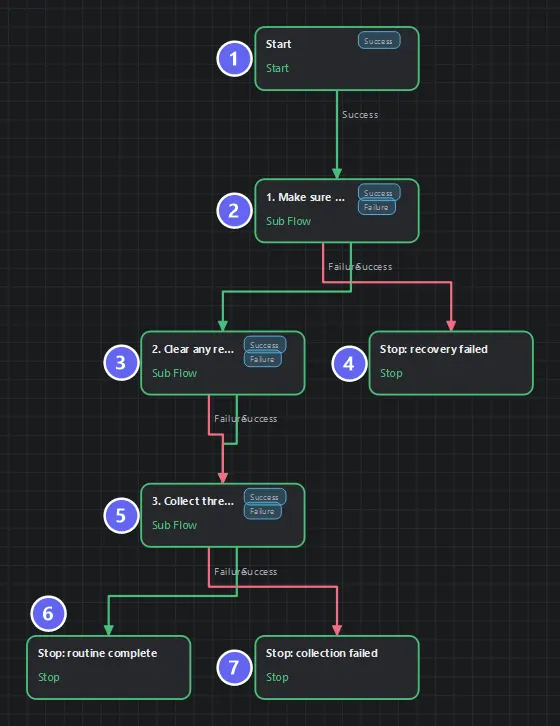
Badges number the nodes in reading order, matching the Build it steps. Notice how little there is to read: each Sub Flow card hides a whole routine, which is exactly what makes an orchestrator worth having.
Three Sub Flow calls, two failure exits, one success. Sixteen-plus nodes of logic are behind those three cards, and this canvas stays readable at a glance.
Build it
- New flow. Under Control, add a Sub Flow node; pick Lesson 09 - Recovery Routine from the flow picker. Name it
1. Make sure we are on the dashboard. - Second Sub Flow → Lesson 04, named
2. Clear any reward popup. - Third Sub Flow → Lesson 07, named
3. Collect three times. In its Inputs list, add a mapping: inputtarget_count=3. That value seeds the child's Flow Input — no Run-form prompt, no editing the child. - Endings:
routine complete(success),recovery failed(failure),collection failed(failure). - Wire as diagrammed — note the popup step's both ports lead on to collection.
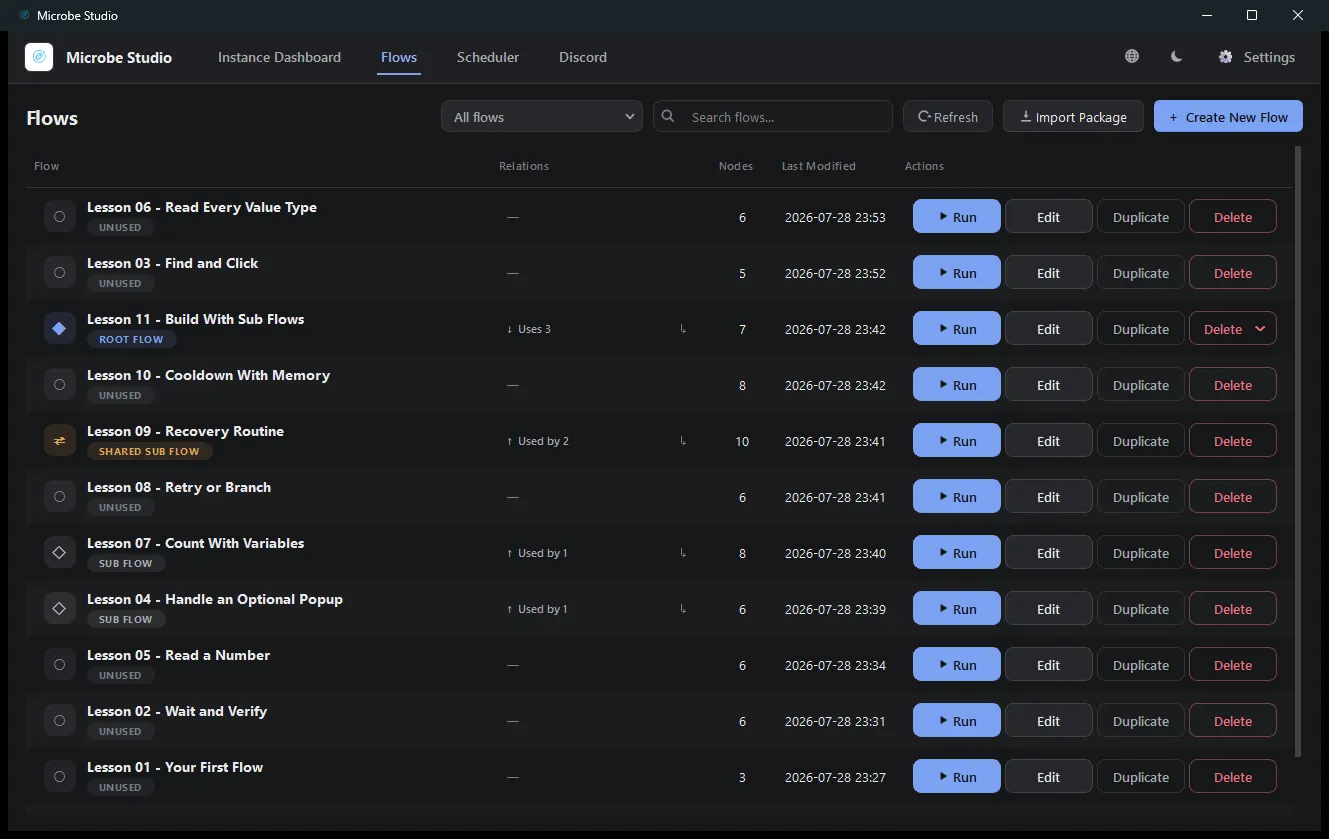
- Save, Auto Layout. On the Flows screen, the Relations column now shows this flow Uses 3, and Lesson 09 as Used by — the library is visible:
The contract idea
A Sub Flow call branches on how the child ended — the child's Stop is its return value:
| Child ends with | The call routes |
|---|---|
Stop: success | Success port |
Stop: failure | Failure port |
So each child's endings form its contract, and this parent simply encodes what each contract means here:
- Recovery fails → abort. Lesson 09's failure means "not on a known screen"; collecting blind would be nonsense. Failure is a hard stop.
- Popup handling "fails" → continue anyway. The worst case is a popup still open; the collection loop will fail visibly if so. Both ports proceed.
- Collection fails → report it. The routine's whole purpose failed; the ending says so.
Deciding which child failures abort the parent is most of the design work in composed automation — and it's a decision you can only make because each child ends honestly.
The argument. target_count = 3 travels from parent to child at call time. The child still works standalone (its Run form still asks), from a queue entry, or from any other parent with a different number. One flow, many callers — that is what Flow Inputs were building toward in Lesson 07.
Run it
From any screen, run the routine:
- Lesson 09 does whatever it takes to reach the dashboard (or aborts honestly).
- Lesson 04 clears a popup if one is up.
- Lesson 07 taps Collect three times and logs its counter.
success · Routine finished.
Watch the run log: you can read the child boundaries and every child's own messages — composition doesn't hide the story.
Best practices
- Children do one job, named as an action (
Recovery Routine, notUtils). - Design endings for the caller. Every child needs at least one success and one failure that mean something.
- Decide per call which failures abort. There is no universal rule — there is your routine's logic.
- Pass arguments instead of editing children.
- No copy-paste reuse. If you are duplicating nodes between flows, you wanted a Sub Flow.
Common mistakes
| Mistake | What happens | Fix |
|---|---|---|
| Copying nodes instead of calling | Fixes needed in N places | Sub Flow |
| Ignoring a child's Failure port | Parent sails on from a failed step | Wire it deliberately — even if "continue" is the choice, make it a choice |
| Argument name ≠ child's input name | Child silently uses its default | Match the declared name exactly |
| Expecting parallel children | Children run inline, one at a time | Concurrency comes from instances, not nodes |
| A flow calling itself | Rejected at run time | Restructure |
Troubleshooting
The call always takes Failure. Run the child alone. Composition doesn't change children — a child failing here fails standalone too.
The child ignored my argument.
The input mapping's name must equal the child's declared Flow Input name (target_count), and the child must declare it as an Input.
Renamed a child — did my parent break? No. Calls bind to the flow's id; names are labels.
Summary
- Sub Flow = call, argument passing, and branch-on-result in one node.
- A child's Stops are its contract; the parent decides what each outcome means locally.
- Libraries emerge from honest endings + declared inputs — which you have been building since Lesson 01.
Next
One lesson left. Lesson 12 · Daily Routine Capstone assembles everything — recovery, OCR, a guarded loop, retry, counters, honest endings — into the shape real production automations take.
Also see: Sub Flow · Stop · Sub Flows guide