Copy from one Windows program into another
The oldest unautomated job in every office: a list lives in one program, a form lives in another, and somebody retypes it. Neither program has an export the other can import, so the only channel between them is the one a person uses — the screen, the keyboard, and the clipboard.
This page builds that flow end to end. It is a real flow, 30 nodes, that runs to Success.
Goal
Read five customer records out of a text file and enter each one into a web form running in Chrome, with a captcha in the way of getting into the form at all.
What it demonstrates:
- Two windows held at once, each addressed by alias rather than by whatever happens to be in front
- One
Ctrl+Cthat brings a whole file back as a flow variable split()turning that one string into five records of five fields- A bounded retry around the captcha — three tries, then give up, never an infinite loop
- Clicking where a Find Image just found something, instead of at a fixed point
Prerequisites: Desktop Mode turned on, and a flow whose target is the desktop.
The shape of it
Three variables, all flow-scoped:
| Variable | Type | Default | Holds |
|---|---|---|---|
vars.noidung | string | "" | The whole data file, as copied |
vars.i | number | 0 | Which record the loop is on |
vars.j | number | 0 | Which captcha attempt |
Step 1 — Open both programs, and name them
Two Open App nodes. The important part is not that they launch something; it is that each one claims a window under a name the rest of the flow can use.
| The form | The data file | |
|---|---|---|
| Program | chrome.exe | notepad.exe |
| Arguments | --app=http://…/form.html, --window-size=1000,760, --window-position=880,60, a private --user-data-dir | …\khach_hang.txt |
| Execution Context | Specific Window | Specific Window |
| Title contains | QLBH | khach_hang |
| Alias | qlbh | nguon |
| Wait after | 1200 ms | 1200 ms |
Use Browse… to pick the program rather than typing a path. It accepts an .exe, a .bat, and — usefully — a .lnk, so the browser shortcut already on your Desktop is a valid answer.
--user-data-dir pointing somewhere private is what makes this repeatable. Without it, Chrome hands the URL to whatever window you already had open and the flow inherits your tabs, your session, and your notification popups. With it, the flow gets a clean window every time, and your own browsing is untouched.
The aliases are the point of the whole design. Every later node names qlbh or nguon in its own Execution Context, so "type this" and "copy that" land in the right program regardless of what the user clicked on while the flow was running. Nothing in this flow ever acts on "the active window".
Step 2 — Get past the captcha, in a bounded way
A Captcha node in solveAndApply mode, scoped to a region of the qlbh window, gets through the first gate. The second gate — a verification code — is wrapped in a loop that will not run forever:
Loop "ma", Count mode, max 3, counter vars.j
  Captcha: read the code and type it        (60s / 20s timeouts)
  Find Image: is the product list visible?
      Success → Break
      Failure → Loop End (try again)
Loop End
The Find Image is doing the verification. The captcha node succeeding means it typed something, not that the site accepted it — so the flow checks for a thing that only exists on the far side of the gate, and only then breaks out.
Three attempts, then the loop ends on its own. A retry without a bound is the single most common way an unattended flow turns into a stuck one.
Step 3 — Take the whole file in one copy
This is the trick worth stealing. Three nodes, all scoped to nguon:
| Node | Setting | Why |
|---|---|---|
| Click | A region over the text area, waitAfterMs 400 | Focus. A window being in front does not mean its text box is receiving keys |
| Key Press | Ctrl + A | Select all |
| Key Press | Ctrl + C, Copy into variable noidung, timeout 3000 ms | The copied text lands in a flow variable |
The Copy into variable field turns a copy shortcut into a read. After this node, vars.noidung holds the file's text exactly — accents intact — and no OCR was involved, so there is nothing to misread.
If the copy does not happen, the node takes Failure rather than returning whatever was already on the clipboard. That is deliberate: the two are indistinguishable by content, and a flow that quietly types last week's copy into a form is wrong in a way nobody notices. The usual cause is focus — hence the Click.
Step 4 — Walk the records with split()
The data file is one line per field, five fields per record:
KH001
Nguyễn Văn A
0901234567
12 Lê Lợi, Q1
1500000
KH002
…
One loop over five records, and each field is an index into the split:
Loop "don", Count mode, max 5, counter vars.i

  Input Text  split(vars.noidung, "\n")[vars.i * 5 + 0]    → Mã KH
  Key Press   Tab
  Input Text  split(vars.noidung, "\n")[vars.i * 5 + 1]    → Tên KH
  Key Press   Tab
  Input Text  split(vars.noidung, "\n")[vars.i * 5 + 2]    → Điện thoại
  Key Press   Tab
  Input Text  split(vars.noidung, "\n")[vars.i * 5 + 3]    → Địa chỉ
  Key Press   Tab
  Input Text  split(vars.noidung, "\n")[vars.i * 5 + 4]    → Số tiền
  Key Press   Tab
  Key Press   Enter                                        → save

Loop End
vars.i * 5 + n is the whole indexing scheme: the loop counter picks the record, the constant picks the field. Change the file to six fields per record and one number changes in five places.
Tab moves between fields because that is what a person does — it needs no coordinates, and it survives the form being moved or resized.
Step 5 — Click where the image was found
Inside the loop, before typing, a Find Image locates the product row on qlbh, and the Click that follows does not use a fixed point. Its target is a live Find Image result — the coordinate that search just produced.
This matters because the list scrolls. A fixed coordinate is right until the page moves; a coordinate that comes from the search that just ran is right every time, and if the search fails the click never happens at all.
Result
The flow ends at a Stop node with status success, and the Desktop Dashboard shows it in the queue with a green Success.
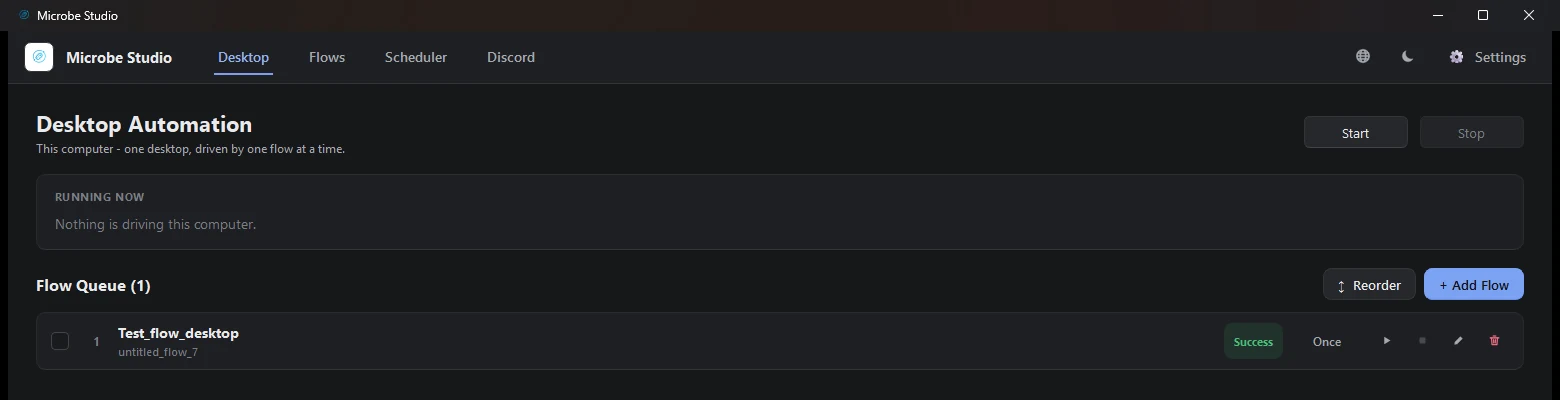
One machine, one flow at a time, and a finished run in the queue.
Why it is built this way
| Decision | The alternative, and why not |
|---|---|
| Windows held by alias | "Active window" — one stray click by the user and the flow types into their email |
| Clipboard, not OCR | OCR can misread; a copy cannot. Use OCR when there is no text to copy, not when there is |
One copy, then split() | Fifty Shift+End/Ctrl+C pairs — fifty chances to lose focus |
| Captcha loop bounded at 3 | An unbounded retry is how a flow becomes a hung process |
| Find Image verifies, captcha only acts | The captcha node typing something is not the site accepting it |
| Click from the Find Image result | A fixed point is right until the list scrolls |
Tab between fields | Five coordinates that break when the window is resized |
Tips
- Test Node before Test Flow. Each node can be checked on its own, and it binds its own Execution Context when you do — so you can confirm the
Ctrl+Creally fillsnoidungwithout sitting through the captcha. - Watch the
waitAfterMsvalues. They are small (105–700 ms) and they are load-bearing: a form that re-renders after Tab needs the pause more than the keystroke needs speed. - Give the loop bounds you can defend.
max 5here is the number of records; if the file might be longer, read the count rather than guessing high. - Keep the data file's shape in one place. The
* 5appears in five expressions. If that grows, a Variable node holding the field count is worth the extra node.
Notes and limits
- One desktop, one flow at a time. Desktop runs are sequential — there is no instance fleet in this workspace, so a second flow waits.
- The clipboard is machine-wide. Another flow copying at the same moment is indistinguishable from this one. Only one copy should be in flight.
- A Chrome
--app=window cannot always be described uniquely. It spawns an invisible twin that shares its title and its class. If the window picker refuses to pick one, use a normal Chrome window, which can be described. split()does not trim. A trailing blank line at the end of the data file becomes an empty record.trim()the copy first, or make sure the file has no trailing newline.
Related pages
- Desktop Mode — the workspace this runs in
- Open App — claiming a window
- Key Press — modifiers, and Copy into variable
- Expressions and Functions —
split()and the other 28 - Captcha — Solve and apply